Feeds:
Posts
Comments

A few weeks ago I started playing with video assessments as an engaging and efficient way to do assessments with multiple classes (as a coordinator I work with 7 classes per grade- so efficiency is key!). Initially I was planning on using this method merely for pre and post-unit assessments, but since then it’s grown into something much bigger.

The bolt of inspiration came from John’s post (and Kelly O’Shea’s idea) to give short weekly assessments each Friday, as a way of students (and teachers) knowing where their learning stands on a regular basis. This reminded me of the holy grail of formative assessments: those wonderful feedback-oriented assessments for learning that everyone at my school always talks about doing but rarely does. I know there are plenty of good ideas out there for how to work quick formative assessments into your teaching, but in the whirlwind of a segregated 40-minute period school day, there never seems to be enough time. Why not turn homework into a formative assessment opportunity?

So, for the past couple of weeks, my 2nd and 3rd grade students have piloted a online experiment with formative assessments, called Show What You Know! Each weekend, I create a simple assessment with something engaging (video clips, funny pictures, an online simulation activity) and a series of questions on our school’s science website. I use GoogleDocs Forms to create the assessment questions, which is simple (and free) to use and collects students’ responses for me neatly in a spreadsheet. Then with a little conditional formatting magic (setting correct answers to be highlighted green and incorrect answers to be highlighted red), the responses look something like this:
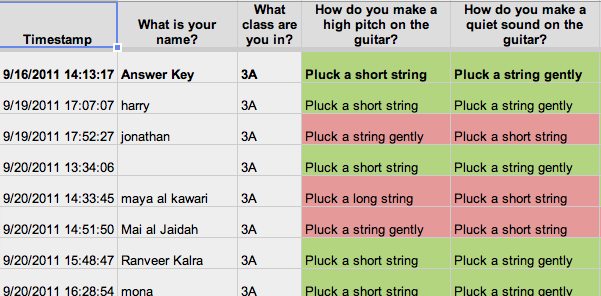
Quickly scanning the spreadsheet I can find out which students are getting it, which ones need some review, and which concepts in general need some work for the whole class. From my coordinator’s perspective, I spend less than an hour of work and I have formative assessment data for 120 students without the hassle of grading. Pretty nifty. Most of all, less time spent assessing means more time left over for the most important part of formative assessment: giving students feedback and letting the results reflect your future teaching.

One key to remember is that these formative assessments are ungraded. The value of formative assessments evaporates if they aren’t a true reflection of what a student understands. So cramming, googling, and parent assisting need to be completely discouraged, and that means not tempting fate by attaching a grade to it. Since we’re still early in the year, it remains to be seen how accurate the formative assessments will be, and whether good-intentioned “homework helpers” will skew the data, but I can say from the first few weeks that it’s already been a very good indicator for several students who are struggling.

Here’s a few examples of our Show What You Knows to check out:

Khan Academy has stirred up a lot of debate among educators about the value of video lectures. On one hand the proponents tout the fact that students can watch them on their own time, at their own pace, and review again if needed. Some educators (like these guys) have even been employing video long before Khan’s rapid rise to notoriety, using video lectures to “flip the classroom” so valuable school time isn’t wasted on something students could just watch at home. The critics of Khan call foul because of the questionable value of lecture itself. A lecture on YouTube is still a lecture, a one-size-fits-all, listen-and-receive-my-knowledge affair. If lecture shouldn’t play a large role in the classroom, what is there to be “flipped” in the first place?

I agree with the critics that KA isn’t anything new under the sun. The media spotlight it enjoys is more about our country’s need to find a new direction in education than any new brilliance of KA. In fact beyond the videos, the “gameafication” of learning that has been created by KA team for teaching math through incentivized drills has much more in common with old-red-school-house pedagogy (Frank lays this out well here).

But despite all the flaws in KA-style teaching, lectures are still an occasionally useful tool in a teacher’s arsenal, and a video lecture probably even more so. So let’s not flush video lectures down the toilet in our disgust at the media’s KA lovefest, instead let’s figure out what this tool is good for. Without further ado, here are my 4 S’s for the best use of video lectures:

  • Short: This should go without saying. Any form of direct instruction needs to stay within the confines of its audience’s attention span. For my elementary students this seems like 2 to 3 minutes.
  • Shallow: If well done, students will remember the content of a video lecture, but only on a shallow, memorized level. Without first-hand experience and mental engagement to let them process the idea in their own mind, there’s not much opportunity for any deep understanding to be created. So keep expectations for learning shallow.
  • Sticky: I mean this in the Malcolm Gladwell sense, not like the gum on your shoe. For the (admittedly shallow) learning to take root, the video lecture must have some memorable appeal that sticks with you: humor, intrigue, a storyline, whatever. I usually opt for humor, maybe because I secretly wish I was Bill Nye.
  • Spot-on: How many times have you teachers out there put on a video for review and realized midway through that it’s not quite what you had hoped? (I know I have!) Maybe the vocabulary doesn’t match what you’ve been using in class, maybe the approach is too complicated or too simple, but it just isn’t fitting for your students’ needs- and you end up with more confusion than when you started “reviewing”. A good video lecture needs to be crafted for a very specific audience and purpose- most generic videos won’t cut it.
How do I put these into practice? I end up making a lot of my own short video lectures to teach scientific vocabulary or review simple facts. It’s not as dramatic as a flipped classroom, but it does mean small bits of direct instruction and basic review can be done at home, and available to the students who need it more than once. I know there are plenty of pre-made video lectures out there already on the internets (BrainPop is a biggie at my school, and is useful at times), but nothing beats a teaching tool that’s been crafted especially for a specific learning purpose. Plus students have a weird fascination with seeing their teachers on-screen. Maybe it’s the era of reality TV we live in, but sometimes I get the feeling that they listen more carefully to video me than actual me!
To give you an idea of what I’m talking about, here’s a few of the videos that I’ve made for our 2nd grade Forces and Motion unit. They were all edited using iMovie, and I swear I didn’t spend more than an hour or two making each one. In fact the gravity video I made yesterday in about a period. So from a cost-benefit analysis perspective, video lectures of this kind are a win-win, even if they don’t deserve headlines about “revolutionizing education”.  As long as video lectures are used as a supplement to thoughtful, contextual, inquiry-based learning experiences, they are tool teachers should keep handy.

One of my responsibilities as elementary science coordinator is to be a mentor to homeroom teachers and help them become better at teaching science. I must admit this is probably the hardest part of my job- it’s one thing to be critical of yourself and work to improve your teaching, but teaching teachers, that’s a different story. Up till this point most of my mentoring has consisted of leading by example, teaching model science lessons in our science labs, which is well inside my comfort zone. But I know in order to take our program to the next level I’ll have to do more: instead of being just the captain of the team, I need to be a coach.

Science coaching (as well as coaching in other disciplines) is pretty trendy right now in elementary ed. However, there seem to be many different varieties out there, and I’m going to need to figure out the recipe that works best at my school. Here are what I believe to be the key ingredients:

  • Model teaching
  • Providing professional resources
  • Teacher observation and consulting
  • Facilitating learning activities
I’m not going to delve into model teaching, because I already do plenty of that, and frankly that’s just regular teaching with another adult in the room. At first I guess it was strange, but once you realize your both on the same team ,it’s actually much better having another teacher with you.
Providing professional resources is easy as well, but probably the least effective ingredient. Just think of all the required readings or faculty “book studies”… in my experience they result in a lot of last-minute skimming and shallow conversations. Good for creating a common language around a new initiative, but not sufficient to reach any meaningful depth. Nevertheless, I’m kind of a professional reading nerd, so I continue to give teachers at my school excerpts from my favorite summer reading each year. One year I put a small note at the end of the reading, asking anyone who finished it to let me know what they thought… still waiting for a response. There are other options out there more interactive than readings, such as NSTA’s Learning Center where teachers can take mini-course online by themselves to brush up on their background knowledge, but I’m not sure how many elementary teachers would have the time or desire.
OK, on to the meaty stuff. Observing teachers can be an intimidating prospect, and also blurring the line between coach and administrator. But I’m going to have to suck it up this year, because nothing embodies the spirit of science coaching more than working directly with teachers on their teaching. Luckily, my school has had some training in an interesting observation protocol called Looking for Learning. You can check out their website for more info, but the basic principle behind this kind of observation is that instead of observing the teacher, your main focus is observing the students. So while students are engaged in an activity you conduct mini-interviews from student to student, aiming to get a grasp of how much learning is actually taking place during the activity. Of course this is all in the context of what the teacher is doing, and how they’ve structured their class. What makes it an interesting approach is that sometimes even when classes appear to be busy learning, there’s not actually a lot of learning taking place (or at least not the kind the teacher intended). The follow-up conversations with the observer and teacher are also interesting as the two compare notes on how they perceived the engagement and learning of different students in the class. Because the focus is on the students, it seems less confrontational, but the approach remains effective because the responsibility of the teacher to ensure all students are learning is clearly implied- if learning wasn’t taking place the next step is to look at what can be done in the future to change that. As with reading professional resources, the effectiveness of observations and consulting will depend on teacher buy-in. So I’m planning on initiating these with teachers who I think would be most receptive initially, and then depend on good word-of-mouth to involve others.
Last but not least, there’s the learning activities, which is just code for getting teachers messy with hands-on science in an attempt to spark those deeper conversations and thoughts about inquiry and pedagogy. When I think back to my favorite professional development experiences (the Dana Hall Science Workshop and a graduate class on experimental design at the University of Maryland), both of them were so stimulating simply because we were expected to do science as a student while thinking like a teacher. The common experiences of searching the beach for fossilized shark teeth and building a water tower of toothpicks led to much more lively and focused discussion between colleagues than any reading I’ve ever done. So I hope to recreate that in some small way for the teachers at my school, letting them dive into a hands on activity with the eagerness of a student, and then encouraging them to process it through the eyes of a teacher. Whether it’s possible to do this successfully in short sessions at the end of a long day with a bunch of familiar faces…. we’ll see!
So there you have it, another work in progress. 🙂 I’ll post more as the plan becomes clearer- in the meantime I’d love to hear from folks who have had successful in-school PD or coaching in the past. Despite these best-laid plans, I’ll probably need to focus my time in a couple of these 4 areas, and it would be helpful to get some idea where to throw my weight.

Call it whatever you want: scientific inquiry skills, practices of scientists, the scientific method- all science teachers are aware of the value of teaching skills as well as content knowledge. But I would go a step further and say that scientific skills are the most important thing our students can learn. Even if my students remember none of the scientific facts or concepts they learned in school, if as adults they are able to think critically like a scientist, then I think this world will be alright. As Carl Sagan puts it so eloquently in his brilliant manifesto about the importance of scientific literacy: “The method of science, as stodgy and grumpy as it may seem, is far more important than the findings of science.” (pg. 22) 

It used to be a simple matter teaching scientific skills, back when they were all packaged up neatly in the “Scientific Method”. I’m sure almost all of us had those steps hammered into our skulls lab after lab after lab: question, hypothesis, procedure… zzzzzz. Of course it was mind-numbingly dull to experience science in that over-simplified, lock-step fashion, not to mention completely wrong. Science doesn’t actually work that way- they don’t follow any standardized linear method. A recent study (Reiff et al., 2002) of how scientists actually do science was revealing: although there were many common skills and practices, there was no clearly defined path or order. So to describe the real scientific method the researchers created this “inquiry wheel”:

When I read about the inquiry wheel in grad school, I was more surprised with the similarities it shared with the old-school scientific method than the differences. It seemed like a mere repackaging of the same old method,with just a breaking down of its stale step-by-step order.  I wondered if by making the scientific method a thing of the past, we teachers would  throw the baby out with the bathwater in our eagerness to purge it from our pedagogy. If we aren’t going to teach the scientific method to students, then how will we present the many practices that scientists use and students should surely learn? While this wheel might paint a more accurate picture, it didn’t appeal to me as an educator for use with my students.

For all of its flaws, I believe the scientific method successfully models one approach to doing science for students.  So what I’d like to do is give that model a makeover- and create something that simply structures the process of doing science while also allowing for the flexibility that reflects real practice. Behold, the Scientific Cycle! 

To create the Scientific Cycle I’ve taken the familiar scientific skills of the Scientific Method, synthesized them with an updated version of “science and engineering practices” from the framework for new education standards in the US, and framed them in a simple cyclical process, inspired by the inquiry wheel. Like the wheel I’ve put Asking Questions at the center of the whole thing, because questioning is at heart of science and can be done at any stage in the process. However, unlike the wheel, I favored a cycle as opposed to keeping it totally non-linear, because I believe the general process of Investigate-Analyze-Explain is a beneficial simplification for students. What you lose in realism you gain in students being able to learn and internalize the process.

By far my favorite aspect of the Cycle is the flexibly of the specific skills involved. In the classroom I plan on starting with the Cycle blank, like this: 

Then as we investigate a concept, we can highlight the skill we’re focusing on by adding it to the cycle. This skills might be different depending on the type of investigation: in one case we might investigate a question by planning and conducting a controlled experiment, analyzing and interpreting the data with the use of a graph, and then explaining the results by writing a conclusion. In another we might investigate by conducting some research, analyze by comparing the information found from various sources, and then explain by debating the answer to our question. So whether you’re researching, observing, experimenting, or just exploring, the Cycle still works and provides a good framework for scientific skills, while also teaching students that scientists approach questions in different ways.

Whaddaya think? What would you change/add/remove? Does this fit at different levels and in different subjects? The Cycle has been percolating in my mind for quite some time, so it would be great to get some feedback from other teachers.


Calm down- this is not a critique of Standards-Based Grading (SBG), which I’m a firm believer in. If you’re not on the bandwagon already, start here. That said, there is one SBG issue I’m grappling with currently that doesn’t seem to get a lot of play out there: points.

Abolish the meaningless cumulative letter grades, abolish the unfair 100-point system, but what system takes it place? There’s a few different choices to choose from, but each with their own pros and cons. Here are my thoughts on each:

Binary-system

The most basic and pure SBG point-system. Students either learned it or they didn’t. One advantage is its stark contrast to tradition ABC grading, so students (and parents) aren’t tempted to try and translate their SBG points into letters grades and avoid the paradigm shift that SBG should entail. The only real drawback I see to the binary system of grading is that it doesn’t recognize progress towards a standard. What do you do if a student doesn’t show complete mastery but only partial mastery? You’ve no choice but to grade that student the same way you would if they showed no understanding at all- this doesn’t seem fair or motivating.

3-point system

Easy fix, right? Just use the 3-point system! Seems so obvious I’m surprised I didn’t think of it until I stumbled upon it here. Now a 3 represents mastery, 2 represents progressing towards mastery, and 1 represents no real progress. While I like the shout-out to progression, introducing that third point does inject some grey matter into the proceedings. How much progress is enough for a 2? That would have to be spelled out pretty clearly on every assessment.

4-point system

Why make things even more complicated? Well, my school has adopted the 4-point grading system to also include a grade for students that “excel” or “exceed”, meaning they demonstrate a deeper understanding or a more advanced understanding than is expected. The thinking behind including this is largely motivational- as soon as you spell out what it means to go above and beyond, there will be students who will strive to get there. However, this tempting 4th point can also create some issues… now the 4,3,2,1 is very close to the old ABCs system. With that much similarity most parents are just going to translate a 4 to an A, so suddenly all of your students should be getting those 4s, and just meeting the standard isn’t good enough any more. Yikes.

Missing the Point?

Despite all of these pros and cons- which system is used might not really matter. After all, the whole point of SBG is to reign in grading for grading’s sake and to get back to the root of what grading and assessment is supposed to be about: feedback. Feedback for students, feedback for parents, feedback about learning. Slapping any number at the top of an assessment- no matter what point-system is used- will defeat the purpose of assessment entirely by distracting students to think about points rather than the content of the feedback. So maybe getting rid of the numbers altogether is the cleanest solution, even if that would require a complete re-invention of the report card.

Other SBGers out there- what do you use? What kind of effect does it have on learning?

My 3rd graders will soon begin their first science unit on light and sound, which in my opinion is a great way to start the year- it’s hard to beat making noise and playing with flashlights. Despite all the hands-on investigations that we’ve done in the past though, there’s always one phenomenon that students have trouble with: refraction, the bending of light. 

I think refraction stumps students because it contradicts their particle-based intuition. Other kinds of light behavior (absorption, reflection, and transmission) make sense even from a particle perspective because they have simple analogies: a sponge absorbing water, a ball bouncing off the ground, sand passing through a sieve. But light bending inside something?? It’s a lot to wrap your head around, even for teachers.

Since we tend to stick to observable phenomenon in elementary science, we don’t get into a discussion of light changing speeds in different mediums (not that that makes it any easier to comprehend anyway!). Instead we merely observe different examples of refraction: a “broken” pencil in water, lens magnification, prism-made rainbows, etc. Sure, students can be trained to say that refracting light is “bending”, but that’s only a superficial understanding of the phenomenon- why bother? This would seem to make refraction a candidate for the chopping block with the new effort to trim standards to only core ideas, but even in the new framework refraction is suggested at the elementary level:

[By the end of 5th grade students should understand that]… because lenses bend light beams, they can be used, singly or in combination, to provide magnified images of objects too small or too far away to be seen with the naked eye. (page 108)

So, how to deepen student’s understanding about refraction? Similar to my past post about making sound waves visible, this year I’m planning on using a simulation to supplement the experimental observation, and hopefully deepen student’s understanding. The simulation is called Bending Light from PhET, the University of Colorado at Boulder’s fantastic treasure-trove of free, online physics simulations. Most of the simulations are intended for older students, like this one is, but the interface is user-friendly enough that I think even my 3rd graders will be able to get a lot out of it. From my Master’s in Ed days though, I remember reading that the main shortfall of using simulations is that students don’t always make the connection between real-life and the simulation. To avoid this, I’m going to try using the simulation and real-life observations in tandem.

For example, take one of our more traditional investigations, like observing the effects of concave and convex lenses. Students would usually look at a penny under the lenses and notice that the convex lens makes the penny look bigger, while the concave lens makes the penny look smaller. Big deal. Why do the different shaped lenses do this? Ummm…. What the students can’t observe easily is the bending of the light, so the lesson usually ends with me drawing a bunch of complicated looking ray diagrams on the board… and the students looking on blankly.

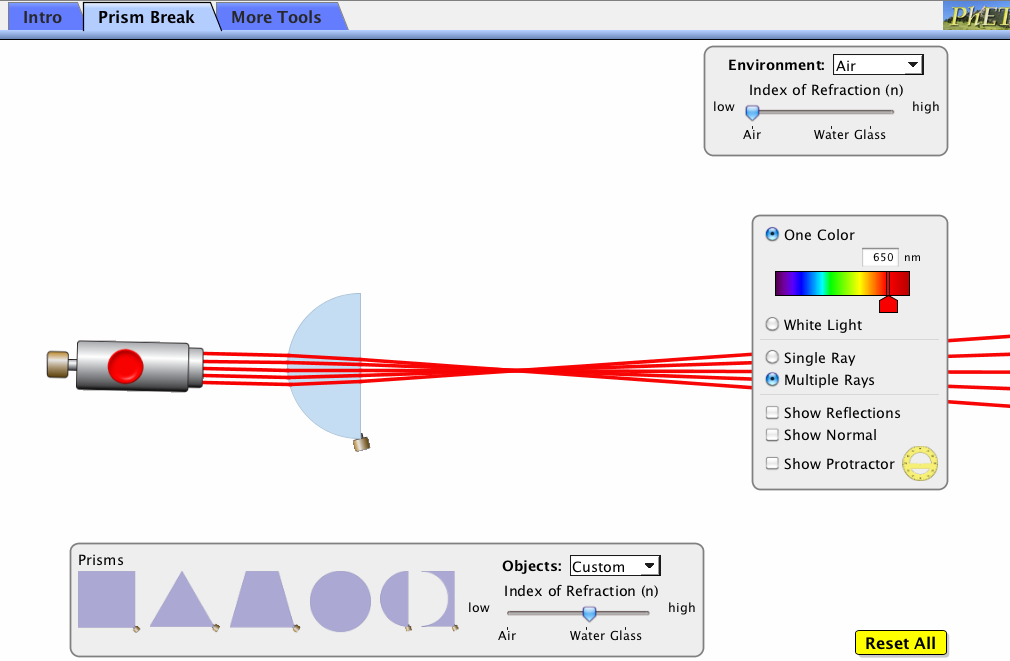
Let’s try that again. This year, right after students observe one the effect of one of the lenses on the penny, they’ll use the simulation to recreate the same setup. Take a look at the simulation screenshot of light shining through a convex lens. 

The cool thing about the simulation is that it shows what the light rays are actually doing with a simple ray diagram. So although they won’t necessarily understanding why refraction is occurring, they should get a deeper understanding of what is happening to the light. In the case with the convex lens above, the light is being bent together (or focused) so it makes objects appear bigger.

However, I should admit that I think there’s going to need to be some prep work done before we roll out the simulations to ensure that students understand what a ray diagram is in the first place. Since we begin the unit the more straightforward light behaviors, that would be a good time to introduce simple ray diagrams as a way of drawing what’s happening to light. For example, students should be able to observe and then draw what happens when light shines on glass: most of the rays transmit and a few are reflected. If students can grasp the ray diagram representation of light, and connect their observations of real-life with the simulations, I think their understanding of light will really shine this year (sorry, couldn’t resist :).

Over my years of teaching I’ve probably used Google image search about 10,000 times. I like to create a lot of my assessments and worksheets from scratch, so I’m constantly searching for that perfect photo or piece of clip art to illustrate something. But as others in the bloggossphere like Dan Meyer have pointed out, using hokey clip art in this age of giga-pixelated multimedia is inexcusable. Using videos in the place of clip art leverages the engaging and real-world qualities of a video clip, and encourages students to see the science in real life. So, this year I’m going to experiment with video assessments. The idea behind a video assessment is that students will watch a video and then explain it demonstrating their scientific understanding (as a side note- videos could also be used to great effect for introducing a new concept, or could even be made by  students themselves to demonstrate understanding- but this is for another post!).

The inspiration for this came from Greg Schwanbeck and his post on dy/dan a couple weeks ago. In the comment thread one of the teachers asked about the logistics of doing a video assessment in the classroom, and it is a little tricky. After all, you want students to be able to watch the video at their own leisure, and go back to a certain part if they want. Anyway, I gave this some thought, and I’ll share with you my prototype Video Assessment 1.0 for your critique: click here to check it out.

The assessment is admittedly simple- I’m just reworking a pre-assessment that I give to my second graders at the beginning of their unit on Forces and Motion. What I’m looking for as a teacher is to see whether they can identify the kinds of pushes and pulls acting in each video, and whether they are familiar with their scientific names (friction, gravity, etc), and any misconceptions they hold. I would also like to include a clip with magnetic force, but try as I might I couldn’t find a good one, so I’ll probably just have to film one myself.

The webpage for the assessment was made using GoogleSites, which allowed me to embed the questions from a GoogleForm that I created (both of these Google tools are free, and I highly recommend using GoogleDocs if you aren’t already). There is an option to embed videos from YouTube directly, but because I wanted to resize the videos to make them fit together tightly on the page, I first ripped them from YouTube using this website and then uploaded them to GoogleDocs in the GoogleVideo format, which lets you resize them.

The cool thing about using GoogleForms for an assessment like this is that when students click “Submit”, their responses are automatically collected in a spreadsheet for you. I work with seven 2nd grade classes at my school, so this is a very seamless way to collect a lot of data. All I’ll need to do is simply send the link of the assessment webpage to teachers so they can share with their students. By using laptop carts and headphones, each student will get their own laptop so they can do the assessment on their own and watch the videos as many times as they need.

One design issue I have is that I would prefer to place each video directly next to the question, but GoogleForms doesn’t allow for embedding videos. So students will have to do a lot of scrolling up and down between watching videos and answering questions. Anyway, we’ll see how it goes down- but in the meantime I would appreciate any constructive criticism you have.

Human sundial

Last year I was lucky enough to receive a grant to build an outdoor classroom at my school, so throughout the school year I’ll be brainstorming ways to make the most of this new learning space. Living in the hot and urban environment of Doha, Qatar, my students don’t have much experience with the outdoors, so I think there’s going to be a ton of opportunities for learning across many different disciplines.

One outdoor classroom project that I’m working on right now is the Human Sundial. It’s similar to the boring old sundials you’re probably familiar with, except that it’s your shadow, and not some little stick’s, that points towards the correct time. Another cool feature of this type of sundial is that it corrects for the change in shadows over the course of the year. For those interested in details, this kind of sundial is technically known as a analemmatic sundial; the analemma is the name of the shape created by the apparent movement of the sun’s location in the sky over the course of the year.

In this post I’ll explain the nuts and bolts of how to make one of these yourself (it’s not hard- I just did it this afternoon!), but first I want to share some ideas for how I’m going to use this as a teacher in (whoops- I mean outside of) the classrom.

Teaching with the sundial

Any time a teacher has a cool tool like the human sundial, there’s the danger that you assume students will just somehow “get it” when you show it off in some classroom demonstration. Even if the demo has a wow-factor, more often than not students will leave remembering the phenomenon, but not the un-wowing explanation that follows it. So how to prevent this?

First of all, I’m not going to show the students the sundial right away. That would be like starting a mystery movie by revealing the culprit in the first scene- boring! First I want students to discover how tricky telling time with the sun actually is. With my kindergarten students, who are mostly focusing on shadows, we could begin by just tracking the shadow of a stationary object (like a flag pole) throughout the day. Maybe have a student mark the end of the shadow every hour, or if we wanted to get hi-tech we could try a time-lapse video. If we have a few classes do this and compare the data, I think the students will readily realize that shadows point in certain directions and have certain lengths at different times of the day. I could then up the ante for comprehension by having a shadow prediction contest (where will this flagpole’s shadow be at 3:30?). The Kgers could then even make their own simple sundial using chalk like I did, and record videos of themselves explaining how it works (assessment, baby!).

For my 5th graders, who also have an astronomy unit and learn about the rotation and revolution of the Earth, I’d like them to learn about the whole analemma effect- how then sun’s apparent location and shadows change over the course of the year. It’s safe to assume they won’t have many prior conceptions about this, and probably think the sun’s path in the sky is relatively constant- so I can exploit that misconception for my own devious learning intentions! I plan on installing the human sundial in the outdoor classroom- but without the analemma date thing to stand on. I’ll just mark the spot that works in September so the students will be none the wiser when they check it out at the beginning of the year. As time marches on though, the sundial will get worse and worse at time-keeping, and by January it should be downright awful. This would be a great time to raise the alarm and have the student’s try to figure out what’s going on. To juice this for all it’s worth I’ll need to make sure there are some grade-level appropriate resources out there that they can use though (any help here would be much appreciated). Then I can use their suggestions and introduce the analemma to fix the sundial…. until next year of course!

Setting up the sundial

I’m no sundial guru, so initially I tried to order up plans for a human sundial from here. Unfortunately, because Qatar’s latitude of 25 degrees North is nearly in the tropics the owner actually refused to sell me the plans, even after repeated requests, because he was worried the sundial’s accuracy and somehow his company’s reputation would be compromised. Whatever. While it’s true that in the tropics shadows aren’t very long in the summer at high noon, we won’t be using our sundial in the summer, and I don’t think Kindergarteners will be too concerned with pinpoint accuracy. At any rate- you definitely don’t need to go out and spend money on plans for a human sundial, because there are plenty of free resources just a click away. So let’s get started…

  1. First you need your exact latitude and longitude. You can use a GPS for this, or you can just go to Google Maps, find your location, and then right-click on it and select “What’s here?”. This will place a little green arrow on your location that you can hover over and get the latitude and longitude. It leaves it up to you to figure out if you’re North or South of the equator and East or West of the prime meridian (good luck with that!).
  2. You also need to know your time zone (how many hours plus or minus Greenwich mean time), and whether you’re currently having daylight savings time. Since Qatar doesn’t bother with daylight savings, this doesn’t affect me, but it will require some alterations to your sundial if you are in a place that does.
  3. Make sure your sundial location is level. You could use one of those bubble-in-liquid carpenter-thingies to do this, or you could do what I did… take a look at your space and say “Looks pretty level to me!”.
  4. Then you need to find true North. No, you can’t use a compass because they point towards magnetic North. There’s a variety of ways to figure out true North, but I think the easiest method is using Solar Noon (when the sun is at its highest point on the horizon), because all you need are some household supplies to make a straight shadow at the time of Solar Noon. Here’s a good explanation of how to do it. Don’t feel like you need to go get all the construction materials though- I hung my weight off an overhead car shade and just traced the shadow with chalk on the pavement.
  5. Once you have a true North/South line set up, then you can start setting up the sundial. To get an idea of what the finished product will look like, I recommend checking out the applet on this website which draws the analemmatic sundial for you when you input the above info (see picture below). You can actually print this out and use it as a mini-sundial as well, just make sure to line it up with your true North/South line.
  6. So far so good? Now on to the human-sized sundial! The math for creating one of this sundials is pretty complicated, so to avoid crunching the numbers yourself, you can use a spreadsheet like this. This spreadsheet might seem a little daunting at first, but the only info you need to input is the cells in blue on the first sheet. Besides the info above you’ll also need to find out your time zone meridian which is the middle longitude for your time zone (you can find this on the picture here, just look at the longitude number above your time zone- for example Qatar’s time zone is +3 so the meridian is 45 degrees East). Finally you need to input the gnomon height, which is simply the height of the thing casting the shadow- you!

When the spreadsheet spits out your numbers, just check the pictured sundial on the sheet called “Layout” and make sure it’s identical to the mini-sundial made by the applet. If it is, you’re ready to start building the real sundial. Start by creating an origin point (like 0,0 on a graph) somewhere in the middle of your true North/South line. Then it’s just like making a giant graph- use the x and y coordinates to plot the hour markers, and the x and “date point Z” coordinates to plot the dates. I did mine in chalk first on the pavement to check if it actually works.

Taken just after 2pm. Boo-ya!

For more information on how you can use a human sundial for some great learning activities, check out my follow-up post here

Teaching students to become “life-long learners” is a popular buzzword bandied about in education. Despite the tiredness of the term, getting students to realize that learning doesn’t just take place within the confines of school and homework assignments is a real challenge (illustrated well in this Think Thank Thunk post). How can we inspire this life-long learningness from an early age?

One experiment I’m trying this year to address this is creating a school science website that puts as many relevant learning resources as possible in the hands of my students and their parents (btw, I’m using GoogleSites, which is a super easy way to make a website for free). For each of the elementary science units we do throughout the year, I’ll be adding stuff like this:

To measure the success of this venture I’m using Google Analytics, which will give me detailed data about how much the site is being used, how many unique visitors are coming, and whether they’re accessing the site from school or at home (by the way, Google Analytics is also free- so have you started making your own website yet?? :). Throughout the year I’ll add various “attractors” to the site such as photos from field trips, resources for assignments, and videos from class, as well as directing parents to the site whenever I get the “How can I help my child?” question (a tough question to answer when you can’t just point them to a textbook).

I also feel like there’s an opportunity to integrate social media into the site some way (student comments, polls, etc), which could broaden the usage of the site. In my previous school I had my 5th grade students create their own websites about their science fair experiments on the kid-friendly site ThinkQuest and I was surprised to see how the ability to leave comments on fellow student’s site generate a ton of buzz (not always of the learning kind of course, but variety is the spice of life). So I’d appreciate any suggestions from folks who have experience in this department.

Predictions? Will simply putting resources out there for students be enough to inspire extended learning outside the classroom? Since my students are fairly high-achievers with involved parents, I have high hopes. Then again, I suspect a website like this will mostly be used by… high-achievers with involved parents, but not reach the students who need some life-long learningness the most. But we’ll see!

Then there’s the issue of how much students visiting the site actually leads to life-long learningness (or learning of any kind for that matter!) I don’t know how I could measure this exactly, but I plan to do as much anecdotal research as I can by asking students and parents how they are using the site, perhaps even conducting some polls. Overall though, I believe that encouraging an interest in learning on your own time (whether it’s reading a book about science, trying an experiment at home, whatever) will have an impact. In my own childhood my parents were careful to surround me with educational diversions (Oregon Trail computer game, science encyclopedias, trips to museums) and these clearly rubbed off. Hopefully creating a virtual version of this for my students will have a similar effect.

You can check out the website I’m creating here, but it’s mostly just a framework now- I’ll be adding content as the year progresses. I would be interested to check out sites that other teachers have made, particularly ones intended to extend learning beyond the classroom. Anyone got some of that out there?

Making waves

My 3rd graders will be starting of the year with a unit on sound and light, which has always been one of my favorites (so much to play with and observe, and so obviously relevant to students’ lives). The sound part of our unit is pretty heavily based on the FOSS unit Physics of Sound which many teachers are probably familiar with. However, there appear to be some changes coming down the pipeline with the impending national science curriculum and this summer’s release of the K-12 science framework from the NRC (for a primer on this, check out this article from Education Week) The new framework has a new approach to physical science standards that could change the emphasis of units like mine.

Instead of grouping sound and energy under energy standards, as many standards documents have done in the past- the NRC’s committee decided to create a separate physical science standard called “Waves and their applications in technologies for information transfer”. Whoah- that’s a mouthful, but it’s cool to see information technology specifically mentioned. Why call out waves specifically? In the committee’s words on page 88:

This idea is included in recognition of the fact that organizing science instruction around core disciplinary ideas tends to leave out the applications of those ideas. The committee included this fourth idea to stress the interplay of physical science and technology, as well as to expand student’’s understanding of light and sound as mechanisms of both energy transfer and transfer of information between objects that are not in contact.” 

I think this is dead on: even thinking about my own unit, we spend a lot of time playing with tuning forks and flashlights, but very rarely emphasize more technological applications such as speakers or radio waves. I realize there are developmental reasons to keep a sound and light focused on observable, visible phenomenon, but surely there are ways to make technological applications of waves more accessible to elementary and middle school students. Here’s one idea that I’ve used with success in the past to make sound waves visible:

Get a sound microphone probe, such as the one sold by Vernier at right. No need to buy one- I borrowed one from my high school physics department, so ask there first. You’ll also need to borrow the software that goes along with the probe to graph it’s output, for example Logger Pro . Now it’s time to play- get the probe set up to collect data, and put it near an instrument that can create pure tones (a electronic keyboard works well, especially on a setting like “Whistle”). Start collecting data and playing your instrument, and you should see the data graphing from the probe. It will look like a mess at first- so stop recording and play with the axes of the graph. You’ll need to stretch out time on the x-axis because most audible sound waves will be so packed together you won’t be able to see the wave. Once you’ve stretched out the x-axis enough that you can see a wave (like the one pictured ont the left), now comes the fun part! Start collecting data again, and experiment with playing notes at higher and lower pitches as well as louder and softer volumes. Pretty neat, huh? You’ll be able to see exactly how the sound wave  changes- how volume is related to the height of the wave and pitch is related to it’s wavelength (or speed of vibration).

Once you’ve got the hang of it, any invisible sound wave can be made visible… which can lead to all sorts of class investigations. I wish I could find an online version of a sound wave visualizer that utilizes a laptop’s built-in mic, because that could allow many students to work with it at the same time. If anyone out there knows of one- let me know!

Any other ideas out there? How else can traditional teaching of waves be updated to include modern technology applications? I’m all ears!